The Product Catalog includes built-in search, filtering, and sorting tools that help you quickly locate specific products within your catalog.
These tools are especially useful when managing large inventories.

Using the Search Bar
At the top of the Product Catalog page, you will find a Search Bar.
You can search for products using:
- SKU
- Product name
- Keywords related to the product

The grid will automatically update to display matching results.
Applying Filters
Filters allow you to narrow down the product list based on specific criteria.
Depending on your configuration, you may filter products by:
- Category
- Stock status
- Sales channel
- Brand
- Product type
To apply a filter:
- Select the desired filter criteria.
- The product grid will update automatically.
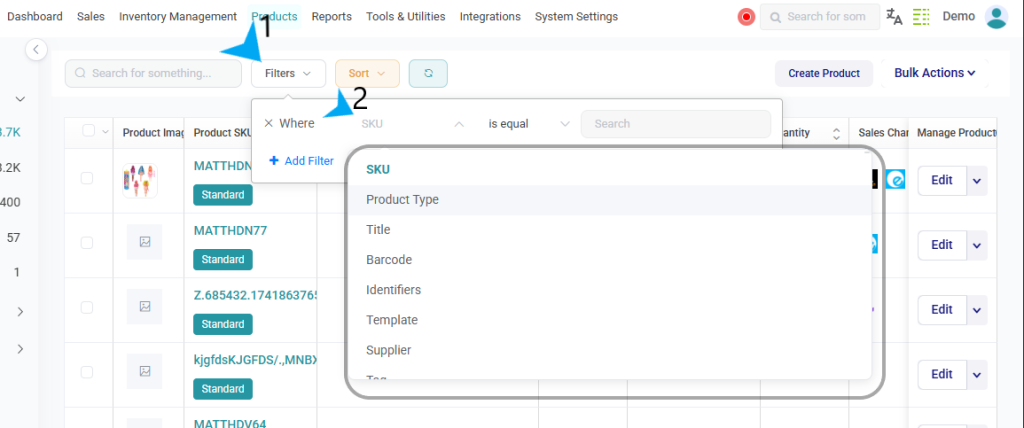
Filters help you focus only on the products relevant to your current task.
Sorting Products
You can sort the product list to change how items are displayed.
Common sorting options include:
- SKU
- Product title
- Price
- Stock availability
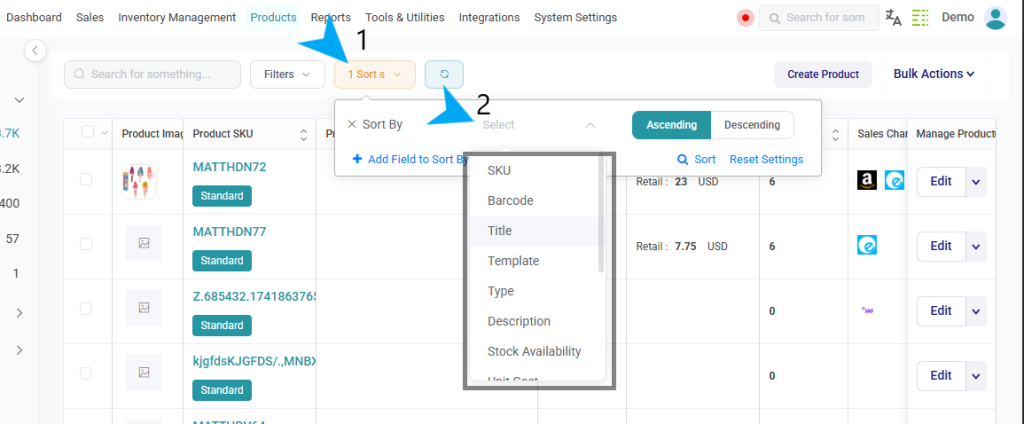
Sorting helps organize products in a way that makes them easier to review and manage.
Using search, filters, and sorting together allows you to efficiently manage your catalog, especially when working with a large number of products.