

The Stock Forecasting section in SellEnvo helps businesses predict future inventory needs based on sales data and current stock levels. It provides recommendations for replenishing products and helps users create purchase orders before items run out of stock.
This section allows users to identify potential stock shortages and take action in advance.
Accessing Stock Forecasting
To access Stock Forecasting:
- Navigate to Inventory Management from the top navigation bar.
- Click Stock Forecasting.
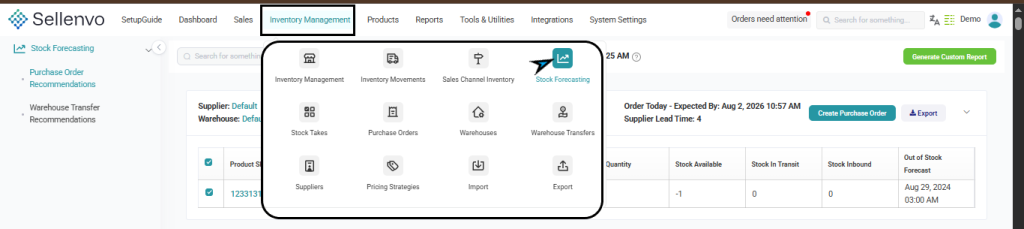
The page displays forecasting data grouped by supplier and warehouse.
Forecast Overview
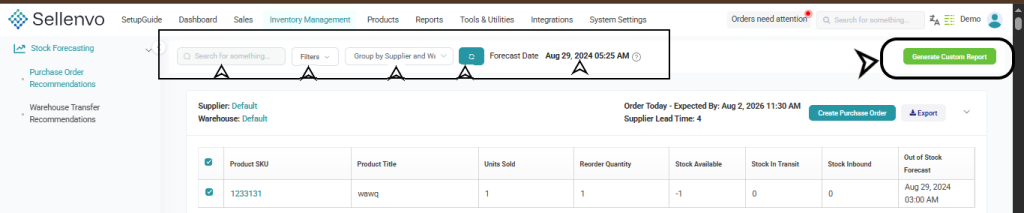
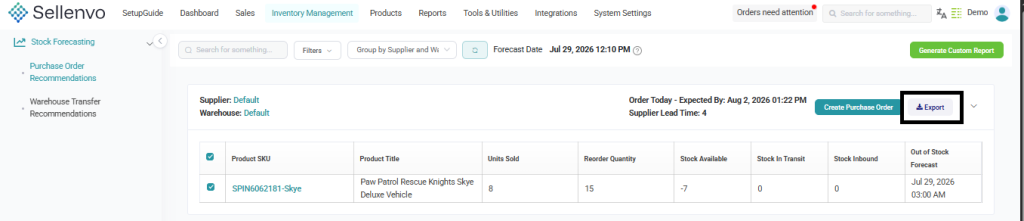
The forecasting dashboard displays product inventory data organized by supplier and warehouse.
Each section shows products that may require replenishment.
The table includes the following columns:
- Product SKU – The product’s unique identifier.
- Product Title – The name of the product.
- Units Sold – The number of units sold during the analyzed period.
- Reorder Quantity – The suggested quantity to reorder.
- Stock Available – Current available stock.
- Stock In Transit – Stock currently being transferred.
- Stock Inbound – Incoming stock from purchase orders.
- Out of Stock Forecast – The predicted date when the product may run out of stock.

This information helps users plan purchasing decisions and maintain healthy stock levels.
Forecast Controls
Several tools are available at the top of the page to help manage forecasting data.
These include:
- Search – Find specific products quickly.
- Filters – Filter forecasting results.
- Group by Supplier and Warehouse – Organize forecast data.
- Forecast Date – Displays the date when the forecast was generated.
- Generate Custom Report – Allows users to customize forecast calculations.
Generating a Custom Forecast Report
Clicking Generate Custom Report opens the Purchase Order Suggestions (Custom Options) panel.

This panel allows users to customize the forecasting calculations.
Available options include:
Days of Sales History
Defines how many days of past sales data will be used to calculate product demand.
Days of Stock for Replenishment
Defines how many days of inventory should be maintained when generating reorder recommendations.
After configuring these options, click View Recommendations to generate updated forecast suggestions.
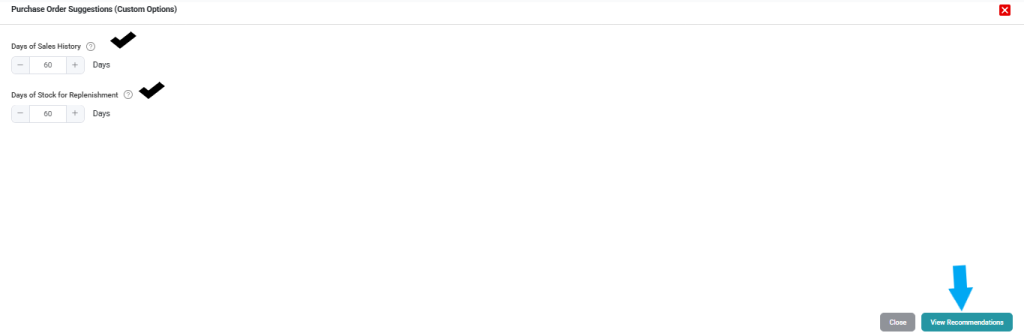
Users can close the panel by clicking Close.
Purchase Order Recommendations
The forecasting page provides Purchase Order Recommendations for products that may require restocking.
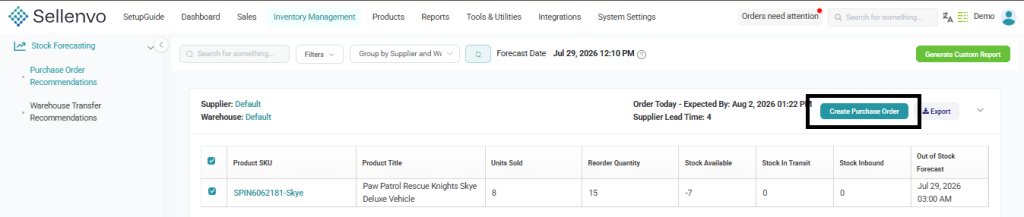
Products are grouped by supplier and warehouse, and the system calculates suggested reorder quantities.
Users can take action by clicking:
Create Purchase Order
This opens the purchase order creation page where the recommended products can be ordered from suppliers.
Users can also download the recommendation data using the Export option.
Warehouse Transfer Recommendations
The Stock Forecasting section also provides Warehouse Transfer Recommendations.
This feature helps determine when inventory should be moved between warehouses to maintain balanced stock levels.
If no recommendations are available, the system will display a message indicating that no transfers are currently required.

Creating a Purchase Order from Forecast
When replenishment is recommended, users can directly create a purchase order from the forecasting page.
Clicking Create Purchase Order opens the purchase order form where users can:
- Enter the PO Number
- Select the Supplier
- Choose the Warehouse Destination
- Add Order Line Items
- Specify Quantity and Price
- Add Tags or Notes
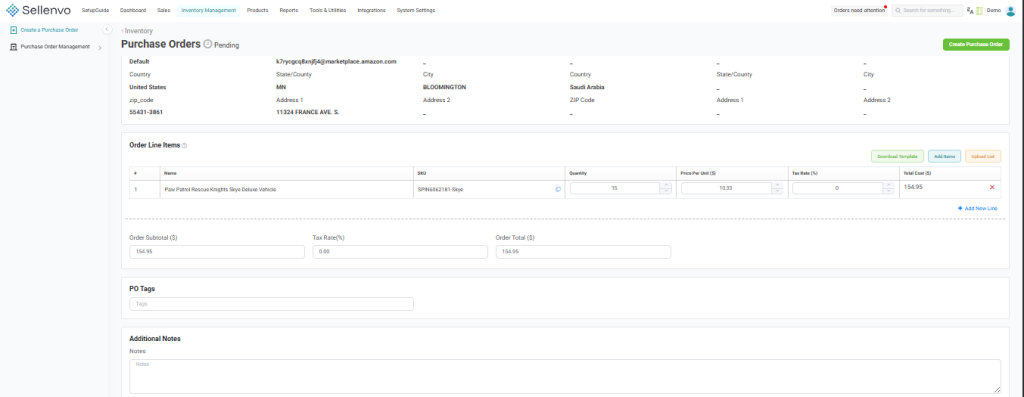
Once completed, the purchase order can be saved and processed.
For More Details about Creating a Purchase Order Press Here: Purchase Orders

